
Frontier guide · Gear and items · 6 of 18
Equipment and Item Boxes
The box is where you change gear, store items, save loadouts and sort your equipment. This page shows each box menu and how to get more box space.
Using the box
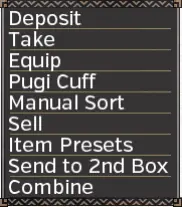
The Equipment and Item Box is the heart of gear and item management. It is where you change weapons, armour, Pugi cuffs and presets, and most other things, except which decorations are slotted into your gear (that is done at the Blacksmith).
You can open the full box from:
- the Blacksmith,
- your House,
- the Caravan's equipment tent,
- the Guild Hall's changing room, if your guild has one.
The smaller boxes you find elsewhere handle items only: they don't let you change armour.
Equipping gear
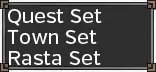
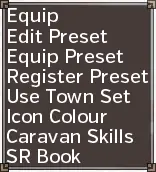
Open the box, choose Equip from the top menu, then Equip again. The game asks which of your sets you are changing, then opens your equipment box so you can pick weapons and armour.
- The Quest Set is what you take on quests.
- The Town Set is what you wear around town, if you turn it on.
- The Rasta Set is what the Rasta you lend to other players wears.
Getting more box space
The item box grows in two ways: by buying certain items from the shop, and by ranking up. It reaches 41 pages at most.
| How | Each step | Total |
|---|---|---|
| Buy the box expansion items (four items; two need HR2 and HR3) | +1 page | +4 pages |
| Hunter Rank 1 through 7 | varies | +20 pages |
| Reach G Rank 1, then GR500 | +3 pages | +6 pages |
| Caravan Rank points: 689,648 / 1,153,328 / 1,799,792 / 2,492,432 / 3,185,072 / 4,180,752 / 5,176,432 / 6,257,456 / 8,028,848 / 9,926,768 | +1 page | +10 pages |
The equipment box grows with the item box up to 20 pages. It gets no extra pages from Caravan Rank or G Rank.
Item presets
An item preset saves the contents of your pouch so you can restock in one press.
- Fill your pouch exactly as you want it saved.
- Open any box and choose Item Presets, then Register Preset.
- Pick a slot and, if you like, give it a name.
Slots 1 to 4 have shortcuts: while the box is open, press L1/L2/R1/R2 on a controller or F/Ctrl/C/Shift on a keyboard. So after a quest you can walk up to a box, open it, press L1 or F and your slot 1 preset is loaded.
With a subscription the game offers 20 more slots (5 to 24), under Item Presets, then Equip Preset. They have no shortcuts and must be loaded by hand.
Sorting your equipment box
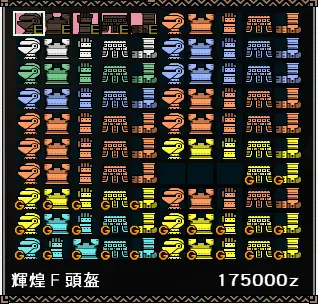
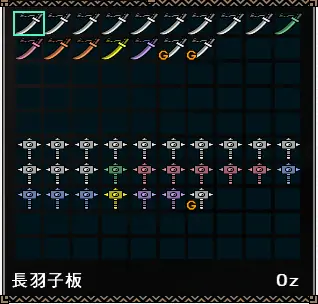
Sort your equipment box by hand. It keeps each armour set together, so you can equip it at a glance even when you can't read every name. It matters most in G Rank, when you start turning armour pieces into gems: with auto-sort it gets very hard to tell the pieces you are keeping from the ones you mean to convert.
How you sort is up to you. The guide's author kept armour on pages 11 to 18, armour to scrap for gems on pages 19 and 20, and weapons on pages 1 to 11, two weapon types per page.
Gear presets
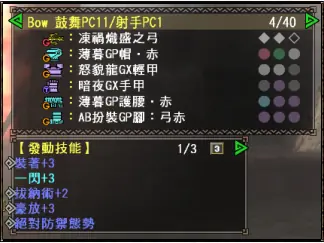
A gear preset saves everything you are wearing.
- Equip the gear you want to save.
- In the Equip menu, choose Register Preset.
- Pick a slot from the list and, if you like, name it.
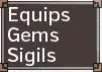
To put a preset on, choose Equip Preset and pick it. Before you confirm, the game lists the gear, every decoration or sigil in it and the skills it will activate.
Older versions didn't save Pugi cuffs in presets, so players noted the cuff in the preset's name. In Frontier Z (from G10 on) the cuffs are saved with the equipment and decorations.
Caravan gem skills
Caravan gem skills open up once you reach HR2 and collect your Caravan Gem in the Caravan area. A coloured orb next to your name shows you have one. A gem gives up to three skills without using any armour skill slots, such as a flat 5% on your weapon's true raw, more KO damage, or not flinching when you see a large monster.
How to unlock and level them is in Regular Events: Caravan.
Written from the Monster Hunter Frontier guide by Fist (as saved in January 2022). That guide describes Capcom's old official servers; we reworded it, laid it out for Hunsterverse and added the "On Hunsterverse" notes (all of them: Hunsterverse vs the old servers). The pictures are from the original guide.